Collections
Keep the terms, tags, places, review cycles and fixed values your organization reuses in one place, so every policy and register uses the same words.
Collections are short lists of facts that the rest of devguard reuses: terms, tags, places, cycles and fixed values. You keep each item once, for example the company's legal name or the "every quarter" review cycle. Policies, registers and reports point to that item. When you change it, every place that uses it shows the new version.
The tasks below follow the order of the work:
- Choose the right collection
- Mention an item in a policy or record
- Import or export a collection
- Archive or delete an item
Each collection has its own guide: acronyms, definitions, labels, locations, schedules and variables. Scripts and integrations: see API below.
Choose the right collection
| You want to | Use |
|---|---|
| Print the same value in many policies, such as the legal name or a retention period, and change it in one place | Variables |
| Explain a term your documents rely on | Definitions |
| Spell out short forms such as ISMS, and link them to a definition | Acronyms |
| Tag risks, assets, vendors, evidence, incidents and processes, and filter lists by the tag | Labels |
| Say where assets and vendors are, with an address | Locations |
| Set how often something is reviewed, repeated or run, such as "every quarter" | Schedules |
Every collection item can also be mentioned in a policy or record. The difference that matters most: a variable holds a value that the PDF prints, a definition holds an explanation that readers look up.
Mention an item in a policy or record
A mention is a link to a collection item inside the text. The editor always shows the item's current name. When someone changes the item, every mention shows the change.
- Open a policy or a record in the editor and click in the text.
- Type
:and the first letters of the item, for example:cadence. A menu lists the matching items, grouped by type, such as Variables or Policies. Each match shows its type and, for a variable, its value. - Choose the item with the mouse or with Enter. It appears as a small badge in the text.
- Choose Save.
To check a mention, click the badge. A card shows the type, the name and the details, such as a variable's value or an acronym's full form. Open details opens the item.
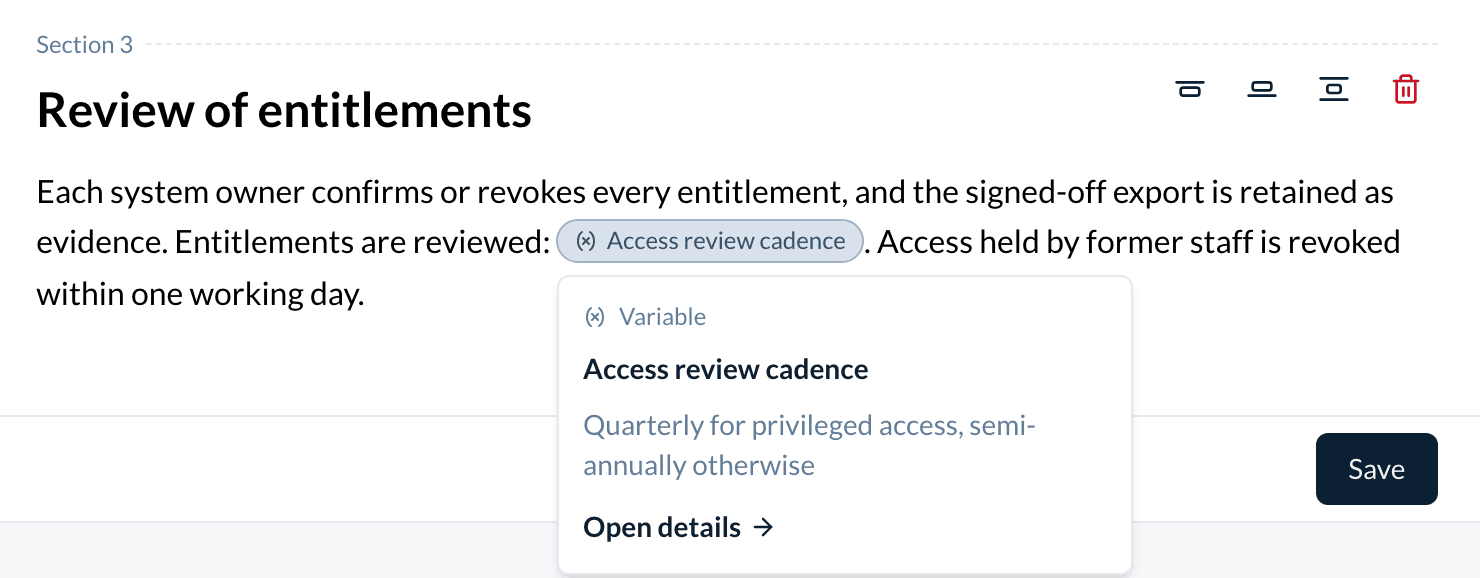
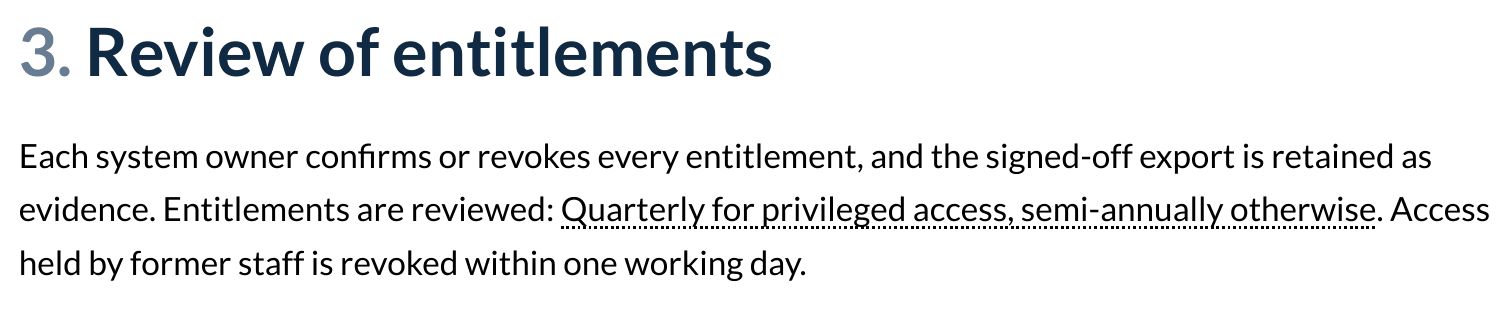
In the policy PDF, a mention prints as text:
| Mention of | The PDF prints |
|---|---|
| Variable | The value |
| Acronym | The full form (Extended) |
| Location | The address |
| Label | The scope and the name, such as privacy:Personal data |
| Definition, schedule | The name |
If the item has no value of that kind, the PDF prints its name.
Import or export a collection
Each collection list has a menu at the top right (...).
- To start a new list, choose Download CSV template. The file has one column for each field.
- Fill in one row per item and save the file as CSV.
- Choose Import CSV and select the file. If the slug column is empty, devguard makes the slug from the name.
- Read the result. Rows with an error are listed with the row number and the reason. The other rows are added.
To export, choose Export all. If filters are set, Export n filtered entries exports only the rows that match them. To export some rows, select them and use the bulk action.
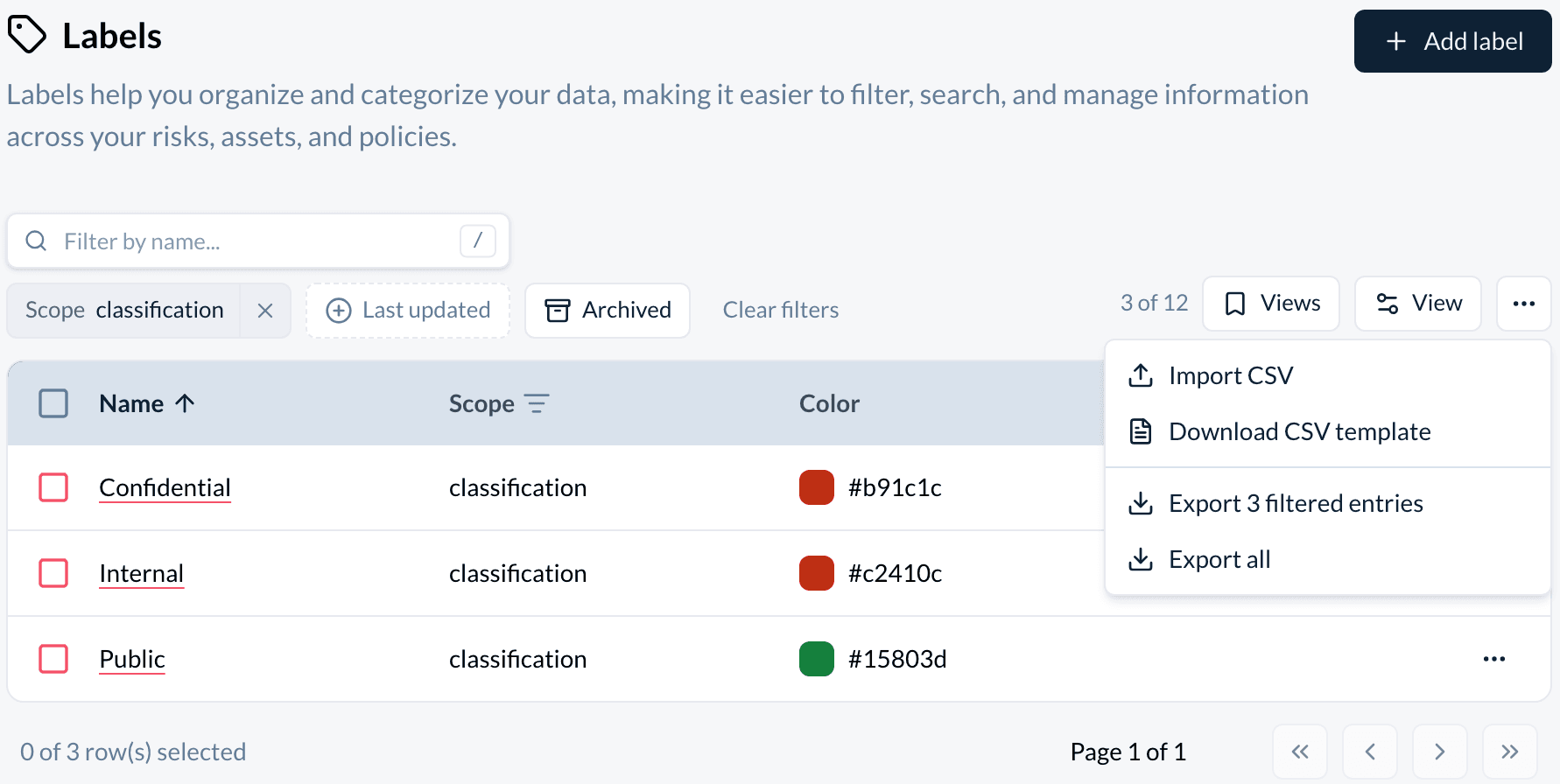
The column names for each collection are on its page, under CSV columns.
Archive or delete an item
Archive an item you no longer use. Delete it only when you are sure no one needs it again.
Archive
- In the list, open the row menu (...) and choose Archive.
- The item leaves the list, the
:menu and the pickers. Risks, assets, policies and other entries that already use it keep it.
Restore
- Turn on Archived above the list.
- Open the row menu and choose Restore.
Delete
- Open the row menu, or select rows, and choose Delete.
- The item and its comments are deleted. You cannot undo it.
Watch out: a deleted label disappears from every entry that had it. A deleted location or schedule leaves the field empty where it was used. A mention of a deleted item stays in the text, and its card says the item no longer exists. The PDF prints the item's old name instead of its value.
Reference
Fields every collection has
| Field | Required | Notes |
|---|---|---|
| Name (Acronym for acronyms) | yes | 2 to 255 characters. |
| Slug | yes | The item's address, for example /collections/labels/detail/quick-win/. Lowercase letters, numbers and hyphens. devguard makes it from the name. The form shows it only in Expert Mode. It must be unique in the collection, archived items included. |
Each item has three tabs: Detail, Comments (type @ to mention a colleague) and History, which shows its audit log. On a location or a schedule, the Detail tab also lists what uses it, under Related Data. On an acronym or a definition, it lists the linked definition and acronyms.
Each list has a name filter, a Last updated filter and the Archived switch. Collection items also appear in search.
Permissions
| Role | Collections |
|---|---|
| Owner, admin | Create, edit, archive, delete, import |
| Member | Read and comment |
| Auditor | Read |
| Organization token | Create, edit, archive and delete over the API |
| Employee | No access |
A member's own API token can only read collections. An API token with limited scopes needs this scope family:
| Collection | Scope family |
|---|---|
| Acronyms, definitions, variables | Controls & frameworks |
| Labels | Organization structure |
| Locations | Assets |
| Schedules | Tasks |
API
- Base URL:
https://app.devguard.ch/api. - Authentication: an API token, sent as
Authorization: Bearer <token>. Send JSON withContent-Type: application/json. - Collection paths:
acronyms,definitions,labels,locations,schedulesandvariables. All six have the same calls. The create fields are on each collection's page.
| Call | Endpoint | Organization id |
|---|---|---|
| List | GET /<collection>/ | query, required |
| Create | POST /<collection>/ | body, required |
| Read | GET /<collection>/{id}/ | not used |
| Update | PATCH /<collection>/{id}/ | not used |
| Archive | POST /<collection>/{id}/archive/ | not used |
| Restore | POST /<collection>/{id}/restore/ | not used |
| Delete | DELETE /<collection>/{id}/ | not used |
The list takes page, limit (5 to 100, default 100), filterByName, filterByArchived (active, the default, or archived), sort and filters. It returns { "items": [...], "total": 12, "page": 1, "limit": 100 }.
filters and sort are JSON, sent as one query value each:
sort: a list such as[{"id":"name","desc":true}]. The sortable column isname(acronymfor acronyms).filters: an object. Every collection hasupdatedAt, as{"type":"date","preset":"last30"}or withfromandtodates. Acronyms adddefinition, labelsscope, and schedulesfrequency, each as{"type":"in","values":[...]}. Frequency values areDAILY,WEEKLY,MONTHLY,YEARLY,HOURLYandMINUTELY.
A single item comes back without the wrapper. All collections return id, slug, organizationId, createdAt, updatedAt and archivedAt (null unless archived) next to their own fields:
{
  "id": "e50abdd5-1b15-42b5-a4e0-7e9a23488e79",
  "slug": "access-review-cadence",
  "name": "Access review cadence",
  "value": "Quarterly for privileged access, semi-annually otherwise",
  "createdAt": "2026-10-20T09:12:44.000Z",
  "updatedAt": "2026-10-20T09:12:44.000Z",
  "archivedAt": null,
  "organizationId": "<organization id>"
}
PATCH needs these fields even when you change something else:
- every collection:
slugand the name field (acronymfor acronyms); - variables: also
value; - schedules: also
ruleSet.
Optional fields you leave out keep their value. Send null to clear one. An empty string also clears a text field, but not latitude, longitude or definitionId. There is no bulk delete in the API.
This call lists all variables with their values. DG_TOKEN is your API token and DG_ORG is your organization id:
API=https://app.devguard.ch/api

curl -sS -G "$API/variables/" \
  -H "Authorization: Bearer $DG_TOKEN" \
  --data-urlencode "organizationId=$DG_ORG" \
  | jq '.items[] | {name, value}'
Errors: 400 when a field is not valid or the slug is already used (the message says if the other item is archived). 401 without a valid token. 403 when the id belongs to another organization or your role cannot write. 404 when the id does not exist.
How is this guide?
Audit programme
Plan your internal audits so that they cover the clauses of a framework over the certification cycle, and see the gaps before the cycle ends.
Acronyms
Keep one list of the short forms your documents use, with the full form and a link to a definition, so readers never have to guess what ISMS or RTO means.