Documentation · Security
Asset assessment matrix
See how many assets sit at each rating for confidentiality, integrity and availability, and which ones are the most sensitive.
The matrix draws your asset inventory on its three ratings: confidentiality, integrity and availability. It shows every asset that is not archived, retired ones included. The overview leaves retired assets out, so the matrix can count more. An asset without a rating of its own takes the rating of its asset class. The levels are fixed: Low (1 to 3), Medium (4 to 6), High (7 to 8) and Critical (9 to 10).
The Assets tutorial covers the overview and the matrix from 5:10.
Open Assets → Assessment Matrix. The tabs beside the title switch between three views of the same assets: Heat map, Triad and Plot.
Heat map
The heat map has one row each for confidentiality, integrity and availability, and one column per level. A cell counts the assets with that rating, so an asset counts once in each row where it has a rating. Select a cell to list its assets under Selected cell, each with its three ratings; click one to open it. Open register view opens the asset list.
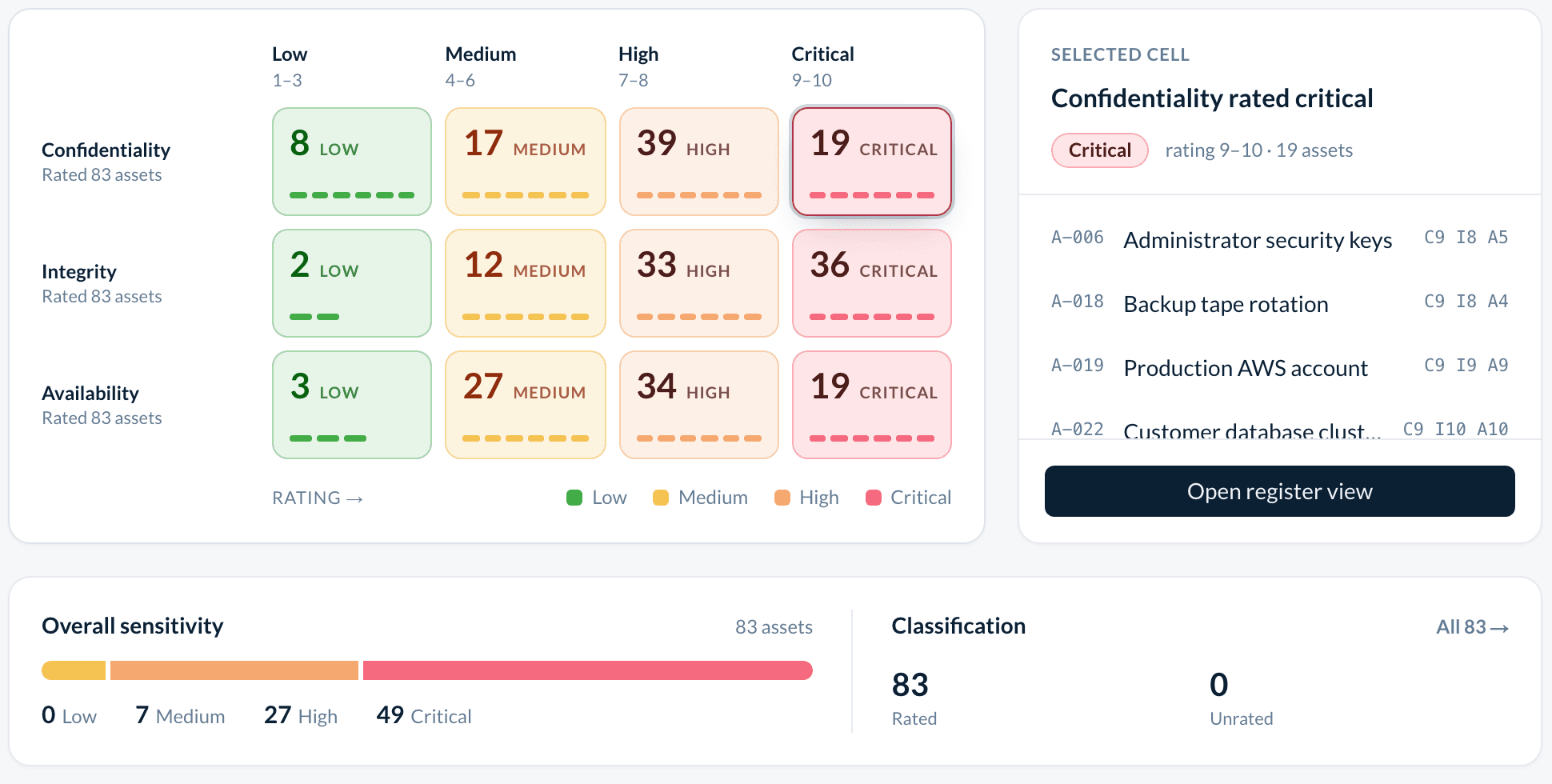
Below the grid, Overall sensitivity places each rated asset at the level of its highest rating, and Classification counts the rated and the unrated assets.
Triad
The triad places each asset by the balance of its three ratings: an asset whose availability rating outweighs the other two sits near the availability corner. Assets with the same balance share one bubble. Its size is the number of assets, and its color follows the most sensitive of them. A bubble of one asset opens that asset; a larger one opens the asset list.
Plot
The plot sets confidentiality against integrity. Assets with the same two ratings share one bubble; point at it to see their names. Beside the plot, High sensitivity counts the assets rated 7 or higher on any of the three, and Top exposure lists the five assets with the highest overall rating. An asset without a confidentiality or an integrity rating is not on the plot, and a line below the count says how many are missing.
The matrix shows how sensitive each asset is; it does not show whether the asset is protected. The overview lists the sensitive assets that still lack a risk or a control.
How is this page?
Access reviews
Check, asset by asset, that the right roles have access when someone joins, when someone leaves, and on a regular schedule, and keep a record an auditor can follow.
Asset reviews
Confirm once a year, or more often, that every entry in your asset inventory is still correct, and turn what is wrong into a finding.